
Athlete questionnaires
Ask how they feel. Read it on a chart.
Write a questionnaire once, send it from an athlete's calendar every day or every week, and get the answers back as curves next to their training. No more form in one tab and spreadsheet in another.
- Free for every coach
- 7 question types
- Hooper, wellness and TQR templates
Hooper index
Monday · 4 questions · 1 min
Fatigue
Very, very goodVery, very badStress
Muscle soreness
Sleep quality
Score
13 / 28
Last 12 weeks
How it works
Write, send, answer, read
Endurance coaching platforms rarely include a real questionnaire builder, so many coaches fall back on Google Forms and a spreadsheet. Here the questionnaire lives in the athlete's calendar, and the answers sit next to their training.
Write
Build it in your coach space, from a template or a blank page. Make each question required or optional, add a help line, and check the live preview of what the athlete will see.
Send
Right-click a day in an athlete's calendar and choose “Send a questionnaire”: once, or every day, every week or every two weeks, for up to 90 days. It shows in their calendar like a session.
Answer
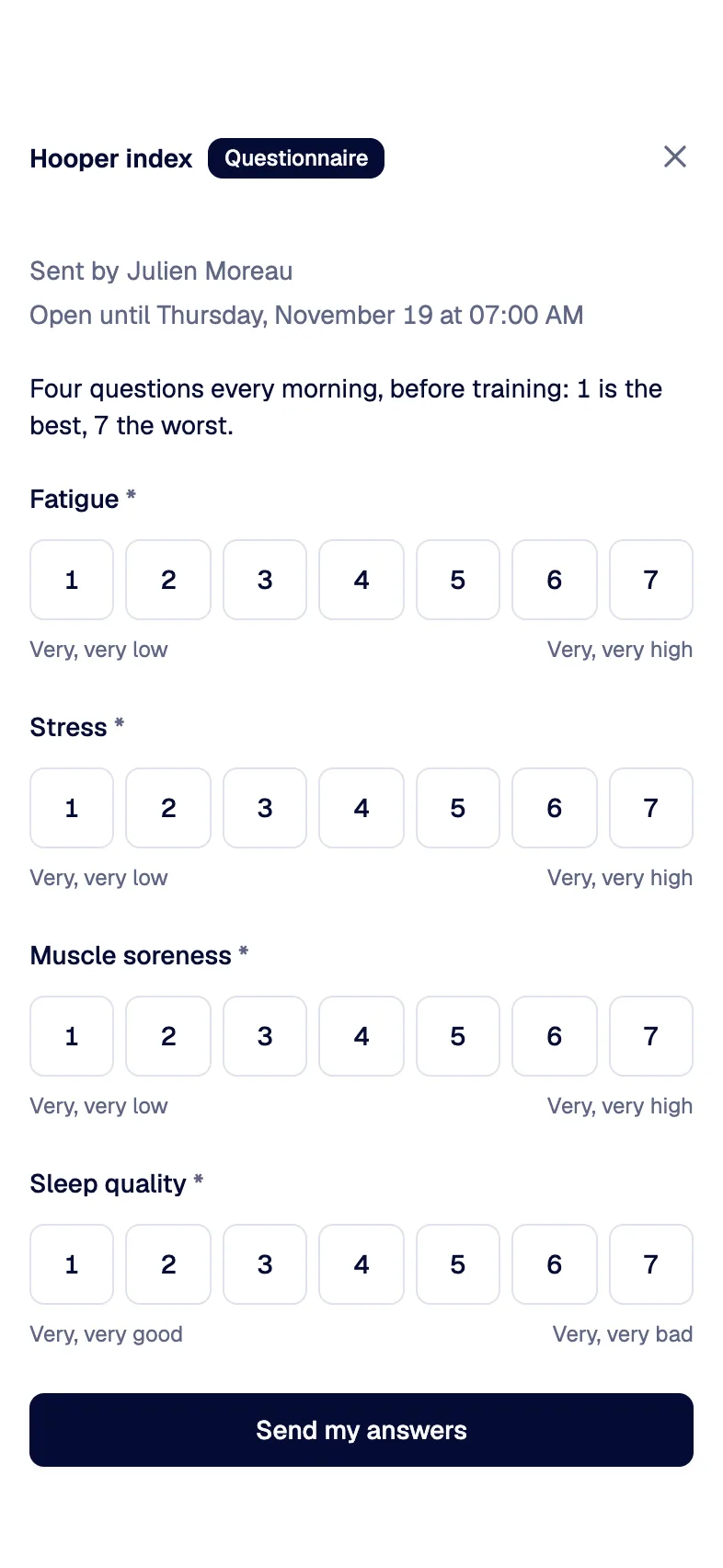
The athlete gets a push notification and an email when it opens, and one reminder if it stays unanswered. Big touch targets on the phone, the same form on desktop. Late answers count, and answers can be changed for 24 hours.
Read
The answers land in the athlete's file, week by week or questionnaire by questionnaire, with a chart for each question and the score as one curve.
In the app
Sent in the morning, read in one screen
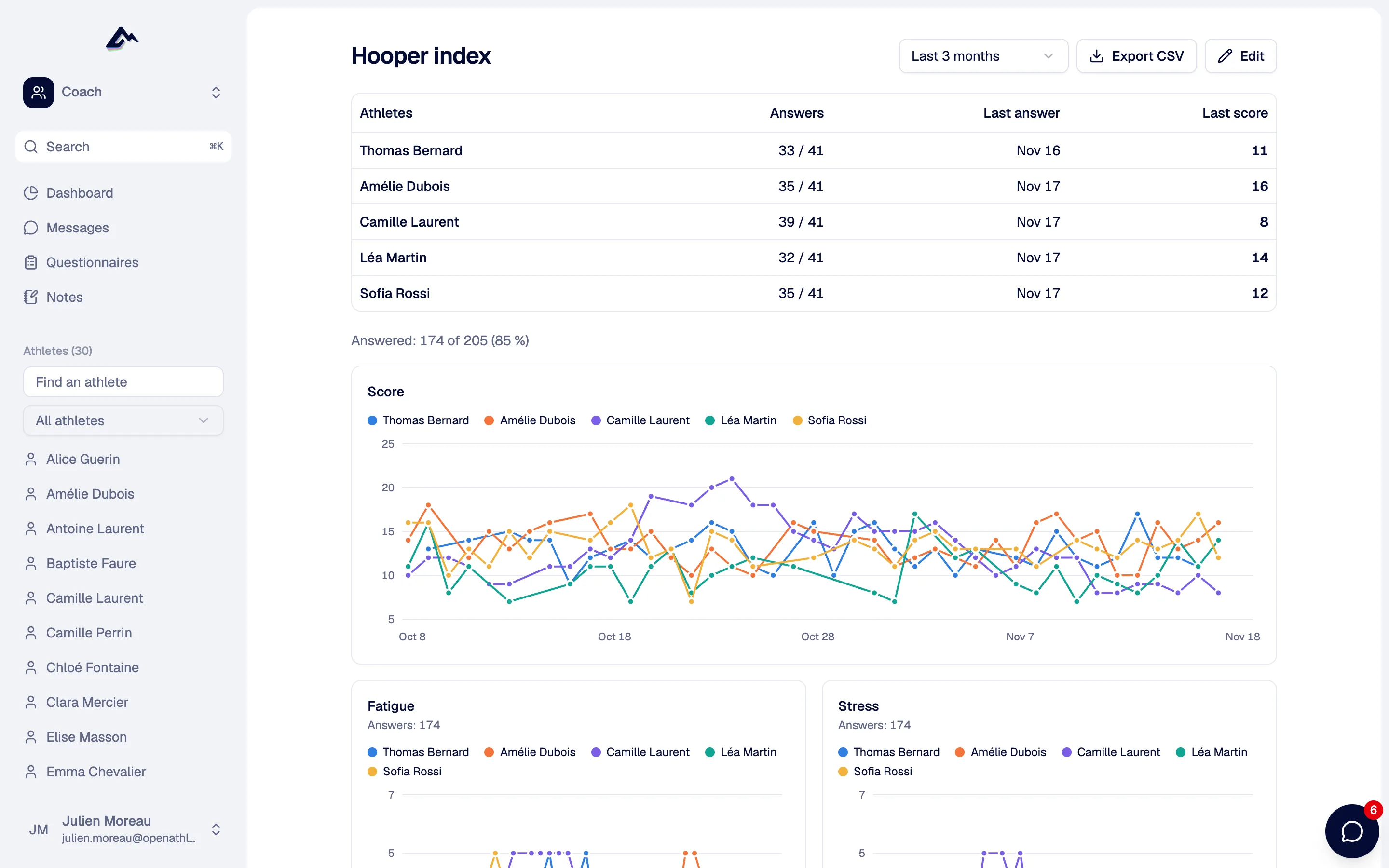
One questionnaire across your athletes
Who answered, the last answer and the last score, then each question drawn over the weeks with a line per athlete. On their phone, the athlete answers in a few taps, right from the Today tab.
Everything an athlete said, week after week
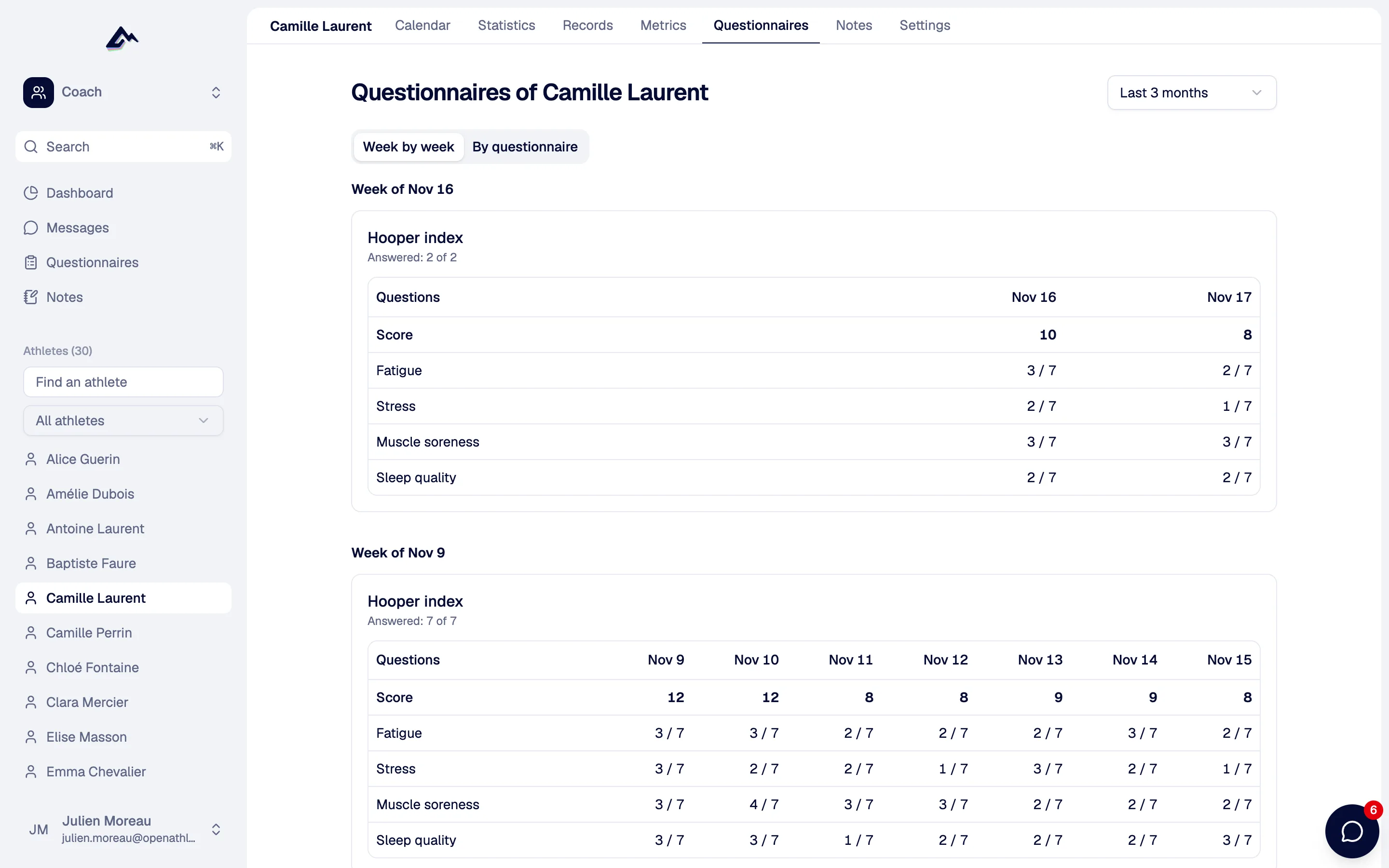
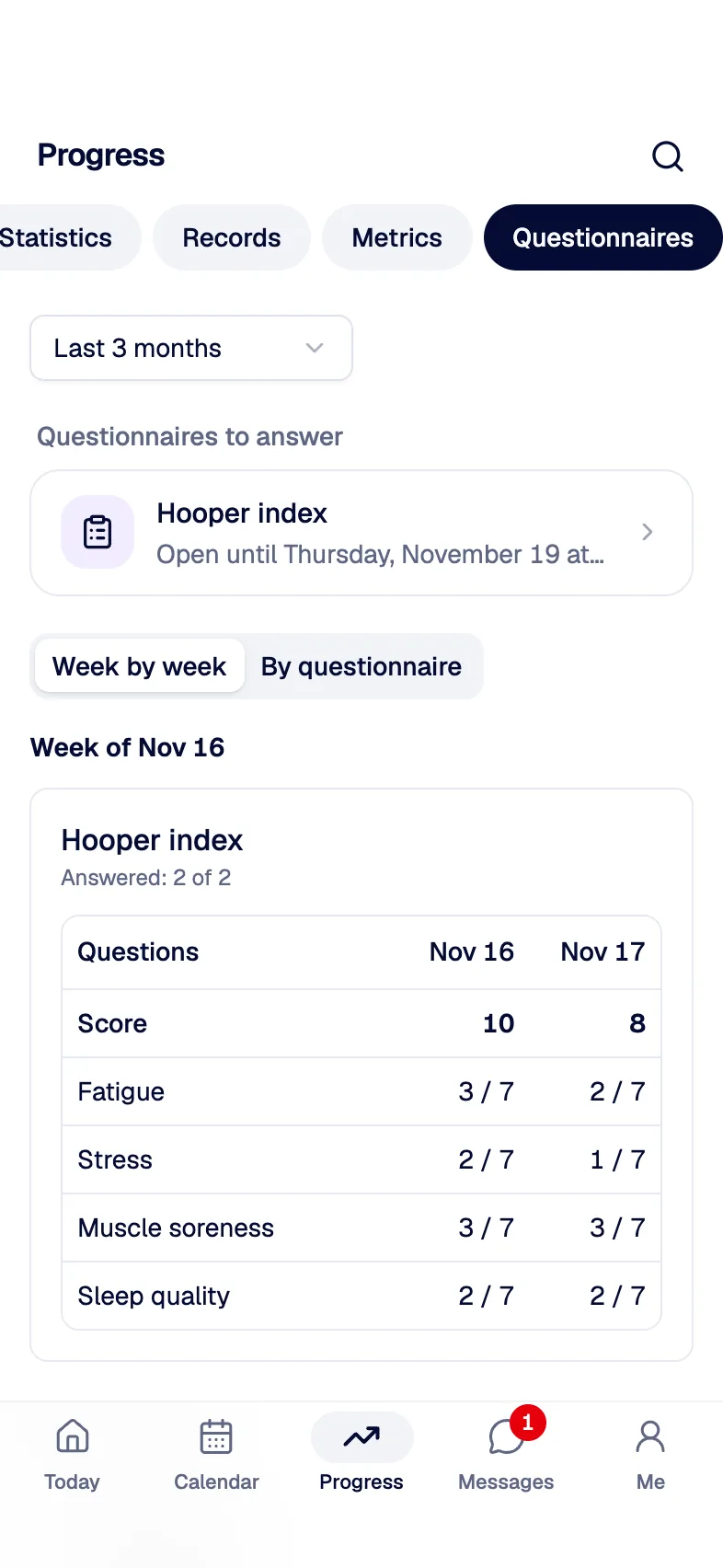
Each week of an athlete as a compact table, with their words below. The athlete finds the same history in their own space. Export the answers as CSV for a spreadsheet; the AI features and the MCP server read them too, so a tired athlete gets an easier session.
Question types
Seven kinds of questions
Enough to rebuild the questionnaires used in sports science, and to write your own. Every question can be required or optional and carry a help line.
Scale
1–5, 1–7, 1–10, 0–10, 1–20 or 0–100, shown as buttons or a slider, with a label at each end, from “very, very low” to “very, very high”.
Number
A value with its unit: weight in kg, hours of sleep, resting heart rate.
Yes / no
Felt ill today? Any pain? One tap.
One choice
A single answer from your list.
Several choices
Every answer that applies, such as where it hurts.
Short text
A word or a line.
Long text
Room for the athlete to tell you how the week went.
Templates
Start from the questionnaires research uses
Pick a template and send it as it is, or adapt it. Each one names its source, so you know what you are measuring.
Hooper index
Hooper & Mackinnon, 1995
Fatigue, stress, muscle soreness and sleep quality, each from 1 to 7, added up to one score from 4 to 28.
Wellness
McLean et al., 2010
Five items from 1 to 5: fatigue, sleep quality, muscle soreness, stress and mood.
Weekly check-in
OpenAthlete
How the week felt, perceived load, motivation, pain, and a free text box for the rest.
Recovery (TQR)
Kenttä & Hassmén, 1998
Total Quality Recovery: how recovered the athlete feels, from 6 to 20.
Blank
Your own questions
Start from nothing and write exactly the questions you need.
Reading the answers
A chart for each question, shaped like its answers
Scales and numbers draw a line. Yes/no answers form a strip, choices become distribution bars, and text answers are listed with their date. Under the charts, a table holds every answer.
- Week by week: each questionnaire of the week as a compact table, text answers below
- By questionnaire: one chart per question, plus the score
- Across athletes: answer rate, last score, one line per athlete, or the group mean beyond 7 athletes
Sleep quality, 1–10
Any pain?
6 / 8
Main worry this week
- Work9
- Sleep5
- Injury2
Comments
- Legs heavy after Tuesday's intervals.
- Good week, slept better.
Score
One number, one curve
Choose which scale questions make the score, and whether to add them up or average them. The score is charted over time, so a trend stands out at a glance.
Training loadMetrics
Answers that fill the athlete's metrics
Link a question to a metric, such as weight, sleep duration, resting heart rate, HRV or Hooper index, and the answer is recorded for that day. When a device measured the same value that day, the device wins.
Watch syncPrivacy
Only the coach who asked reads the answers
The athlete's other coaches don't see them. When the questionnaire was sent within a club, the club's coaches who follow that athlete can read them too.
For clubsOwnership
The answers belong to the athlete
A coach can't delete a questionnaire once it has been answered. If the coach deletes their account, the answers stay with the athlete.
OpenAthlete for coachesSelf-hosted instances too
Questionnaires are part of every instance, self-hosted ones included. The answers are stored on your server and never leave it.
Questions people ask
Yes. Every coach can write questionnaires and keep one active for free, on the free plan as with Supporter. Several active questionnaires at once come with Supporter.
A push notification and an email when the questionnaire opens, and a single reminder if it is still unanswered. Emails can be turned off in the settings or with the one-click unsubscribe link. The questionnaire also shows in their calendar, like a session.
Yes. A late answer is accepted until the next occurrence of the questionnaire, or for a week if it does not repeat. Once sent, answers can be changed for 24 hours.
The coach who wrote the questionnaire. When it was sent within a club, the club's coaches who follow that athlete too. The athlete's other coaches don't see them.
Both are templates, along with the TQR recovery scale and a weekly check-in. The Hooper index adds up to one score from 4 to 28, and can fill the athlete's Hooper index metric for the day.
Yes. Every analysis exports as a CSV file, one row per questionnaire sent and one column per question. When you generate or change a session with AI, the last two weeks of answers go with the request, and agents connected through the MCP server read them with get_questionnaire_answers, within the same access rules.
The rest of the weekly loop
All featuresSend your first questionnaire this week
Create a coach account, pick the Hooper template, and send it to an athlete from their calendar.
Free forever. No credit card.